
Description and Remediation of the File Deletion Vulnerability in Application Server V9.0
Overview
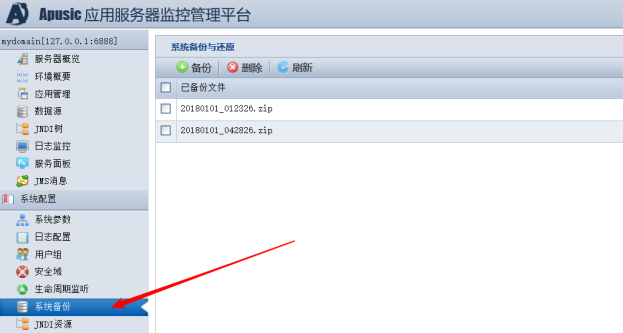
An administrator logs in to the management console of Application Server V9.0 SP5 and later versions and enters the system backup management module. The administrator can modify the file path parameter to delete files in other directories, as shown below:
Click to view the system backup module
Create a file named pwn in the server root directory
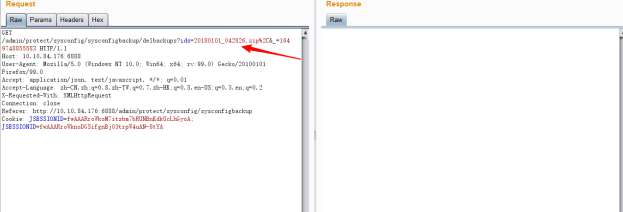
Click Backup to generate a backup file, then select the backup file, click Delete, and capture the request with Burp Suite;
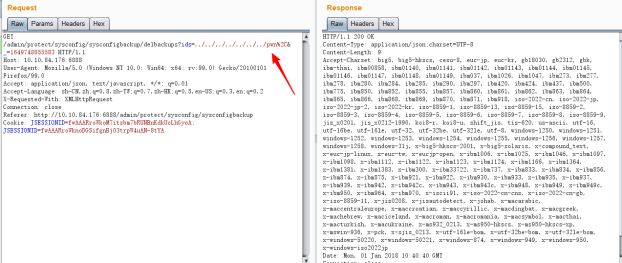
Modify the value of the ids parameter to ../../../../../../../../../pwn%2C
where %2C is the URL encoding of ","
The /pwn file on the server has been successfully deleted;


Root Cause Analysis
This function of the application server management console does not validate the backup file, resulting in the deletion of unauthorized files.
The reproduction steps above require administrator privileges to log in to the management console; no other unauthorized user can perform the operation, so the impact is limited.
For security reasons and to avoid accidental file deletion, applying the patch is recommended.
Resolution
Apply the following patch to resolve this issue. Steps:
1) Overwrite the corresponding file in the lib directory under the Application Server V9.0 installation directory with the attached razor.jar
2) Restart the application server
Other Remedies
Product versions released after May 2022 have fixed this issue.